
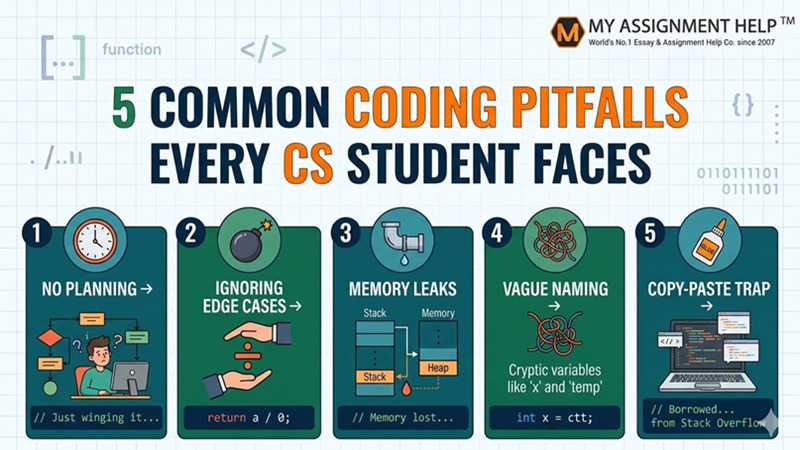
The transition from theoretical logic to functional code is rarely a smooth journey. For many Computer Science students, the “Aha!” moment of understanding an algorithm is quickly followed by the frustration of a “Segmentation Fault” or a cryptic logic error. As the demand for software engineering talent continues to grow, with the U.S. Bureau of Labor Statistics projecting a 25% growth in software development roles through 2032, mastering the art of clean coding is more critical than ever.
However, many students fall into the same recurring traps that lead to sleepless nights and buggy submissions. Avoiding these pitfalls isn’t just about passing a class—it’s about building the professional habits needed for real-world success.
1. The Logic Gap: Coding Without a Blueprint
A common mistake is jumping straight into coding without fully understanding the problem first. In a classroom setting, students often rush to open their IDEs the moment they read an assignment prompt. This lack of planning leads to convoluted logic and “spaghetti code.”
Professional developers spend about 70% of their time planning and debugging, and only 30% writing code. Jumping straight into complex tasks like object-oriented design or multithreading often leads to failure. If you find yourself struggling with complex languages, seeking java assignment help can provide the structured guidance needed to understand how to architect your code before you write the first line.
How to Avoid It:
- Pseudocode First: Sketch out your logic in plain English or flowchart format.
- Divide and Conquer: Split the problem into smaller, testable functions instead of creating one large block of code.
2. Neglecting Edge Cases and Input Validation
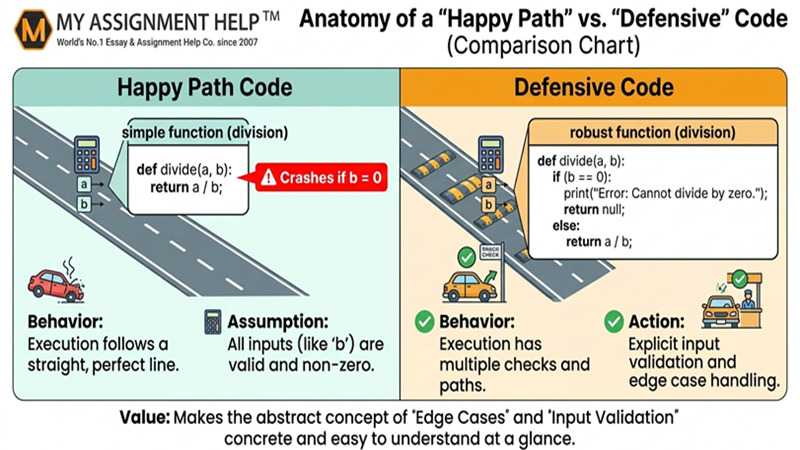
A common pitfall is writing “happy path” code—code that works perfectly as long as the user provides the exact input expected. In the real world, users enter strings where numbers should be, or provide null values that crash a program.
According to the Consortium for IT Software Quality (CISQ), the cost of poor software quality in the US reached $2.41 trillion in 2022. Much of this is due to unhandled exceptions and security vulnerabilities. Students often lose marks because their code fails when a professor inputs a negative number or an empty list.
How to Avoid It:
- Adopt “Defensive Programming”: Always assume the input could be wrong.
- Use Unit Tests: Write tests for the smallest possible inputs (0, 1, null, or max values) to ensure your logic holds up under pressure.
3. Ignoring Memory Management and Resource Leaks
For students working in lower-level languages like C or C++, memory management is a notorious hurdle. Failing to free allocated memory leads to memory leaks, which can slow down or crash an entire system over time. Even in garbage-collected languages like Java or Python, students often leave file streams or database connections open, leading to resource exhaustion.
Grasping memory allocation is essential for optimizing performance. If you are overwhelmed by these technical nuances, a professional assignment writing service can help bridge the gap between classroom theory and practical application, ensuring your projects meet rigorous technical standards.
How to Avoid It:
- RAII Pattern: Apply the “Resource Acquisition Is Initialization” principle.
- Profiling Tools: Use tools like Valgrind (for C/C++) or the built-in profilers in IntelliJ and VS Code to monitor memory usage.
4. Poor Naming Conventions and Lack of Documentation
“Variable X,” “Function 1,” and “Temp” are the hallmarks of a student coder in a rush. While the code might execute correctly, it is unmaintainable. Code is read much more often than it is written. If you revisit your project three months later, cryptic naming will make it nearly impossible to debug.
A study published in the Journal of Systems and Software suggests that developers spend up to 60% of their time simply trying to understand existing code. Documentation isn’t just for your professor; it’s for your future self and your future colleagues.
How to Avoid It:
- Self-Documenting Code: Pick clear, descriptive names (e.g., calculateTotalTax rather than calc).
- Comment the “Why,” Not the “What”: Don’t explain that i++ increments a variable; explain why that loop is necessary for the specific business logic.
5. The “Stack Overflow” Copy-Paste Trap
While platforms like Stack Overflow and GitHub are invaluable resources, many students use them as a crutch rather than a learning tool. Copying and pasting snippets without understanding the underlying logic is a recipe for disaster. Not only does this lead to plagiarism concerns, but it also creates “Black Box” code—if something breaks, you won’t know how to fix it because you didn’t write it.
How to Avoid It:
- The 20-Minute Rule: Try to solve the problem yourself for 20 minutes before looking up a solution.
- Type, Don’t Paste: If you find a solution online, read it, understand it, and then type it out manually into your IDE while adjusting it to fit your specific variables and logic.
Key Takeaways
| Pitfall | Impact | Solution |
| No Planning | Spaghetti code/Logic errors | Use pseudocode and flowcharts. |
| Ignoring Edge Cases | Program crashes/Security risks | Implement defensive programming and unit testing. |
| Memory Leaks | System slowdowns | Monitor resource allocation and close streams. |
| Vague Naming | Unmaintainable code | Use descriptive, camelCase or snake_case names. |
| Copy-Pasting | Lack of understanding | Analyze external code before adapting it manually. |
FAQ Section
Q: Is it okay to use AI to help with my coding assignments?
AI can be a helpful tutor for explaining concepts, but depending on it to write entire code blocks hinders the development of essential problem-solving skills. Use it to debug or brainstorm, not to automate your learning.
Q: How do I get better at debugging?
Start with “Print Statement Debugging” for simple logic, then progress to your IDE’s integrated debugger to step through code line by line.
Q: Why does my code work on my laptop but not on the submission server?
A: This is usually due to environment differences (different compiler versions or OS paths). Always test your code in an environment similar to the one your professor uses.
About the Author
Alex Sterling is a Senior Content Strategist at MyAssignmentHelp. With over 8 years of experience in technical writing and a background in Computer Science, Alex specializes in making complex programming concepts accessible to students worldwide. When not analyzing SEO trends, Alex mentors junior developers on clean code practices and software architecture.
References
- S. Bureau of Labor Statistics (2023). Occupational Outlook Handbook: Software Developers.
- Consortium for IT Software Quality (CISQ). The Cost of Poor Software Quality in the US: A 2022 Report.
- Martin, R. C. (2008). Clean Code: A Handbook of Agile Software Craftsmanship.
- Journal of Systems and Software. (2021). Impact of Code Readability on Maintainability.